Google

ToTAL TiMEpASS

Hi frendz this is ma site and all ya bloggers are welcomed here .... you will find everythin you wish for except favours from me lolz .... please do click on ads if you wish to help me ..... :) have fun and keep blogging

Thursday, December 13, 2007


Group Creator for Smartphone’s
By Mattias Danielsson

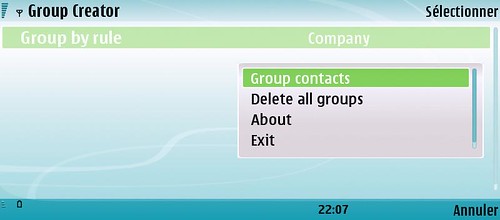
Group Creator is a small freeware that reads the mobile phone contact list and groupthem according to the settings. There are group rules by company, country, family name, note and job title. Group Creator uses the group functionality in the phobook to organize your contacts by adding them to existing groups. If the group not exists Group Creator will create the group. Group Creator never removes or deletes anything, it only adds Change settings by press the navigation key left and right. Group your contacts by select Group contacts in soft menu. Open the soft menu by press down the navigation key or left soft key.
Feel free to contact me if you have any question, found a bug or if you havesuggestions on improvements.


Version
Date
Change log
Download for S60 3rd 0.96 2007-11-27
- Let the user define how many contacts a group has.
sis
zip

0.95.1 2007-11-19
- Small fixes regarding compatibility issues on some devices.
sis
zip
0.952007-11-18
- Added soft menu by pressing down the navigation key.
- Updated menu texts.

0.94 2007-11-06
- Adding contacts to previous created groups.

0.93 2007-11-04
- Changed method to allocate memory. This bug was introduced in v0.92 and could cause memory error.
- Added Create Groups in the soft menu.
- Defines for max string length and number of groups was switched.

Wednesday, December 12, 2007

Gizmo for S60


Overview
Install the Gizmo client on your device to start using instant messaging (IM), presence and Internet calls. After installing the application you are able to create an account or use the existing Gizmo username and password. With a WLAN connection you are able to use all the features, and IM and presence are available even when you are connected over 2G or 3G.

Installation instructions
Download the files below to your computer and perform the installation using PC Suite. You have to install two separate packets in the following order. Sorry for the inconvenience.
N95, N80 Internet Edition, N73 Music Edition (no VoIP).

Works but not fully tested on: N91, E61i, E65, N76 (no VoIP), E90, 6110 Navigator (no VoIP), 6290 (no VoIP), 6120 (no VoIP), 5700 XpressMusic (no VoIP)

  • Compatibility
  • N80 Internet Edition, N73 (no VoIP support) and N73 Music Edition (no VoIP support). Works but not fully tested on: N91, E61i, E65.

  • Important note!
  • If you have Gizmo rel 1.31 or previous version installed with Nokia Contact Services Support Package, please remove both Gizmo file & Support file manually before installing new versions.
Firstly, install Nokia Internet Services Support Package to the device memory (not to the memory card).
Download (SIS, 730 KB)

Secondly, install Gizmo to the device memory (not to the memory card)
Download (SIS, 255 KB)


**********************
N95. Works but not fully tested on: N76 (no VoIP support) and E90. 6110 Navigator (no VoIP support), 6290 (no VoIP support), 6120 (no VoIP), 5700 XpressMusic (no VoIP).

Firstly, install Nokia Internet Services Support Package to the device memory (not to the memory card).
Download (SIS, 730 KB)

Secondly, install Gizmo to the device memory (not to the memory card)
Download (SIS, 243 KB)

S60Ticker 0.22 (Beta)


The application S60Ticker offers in version 0.2 (beta), a typical Ticker (treadmill)


For current and important information. Currently, all incoming SMS messages
With IP phone number and message text.


Because of the publicly available SDKs * Developer
Further applications, and integrated data services:
  • News Feed
  • Stock Ticker
  • Mobile Banking
  • Weather Forecasts
  • Current music titles (playlist)
  • Ff
download for s60v3 handsets


These and other options will be in the configuration file:

> c:\Data\Sonstige\S60TickerServer\Server.cfg > C: \ data \ Other \ S60TickerServer \ Server.cfg
[Main] [Main]
Position=1 //Anzeige: 0-oben, 1-unten Position = 1 / / Display: 0-oben, 1-unten
PositionOffset=21 //Anzeige-Offset: Anzahl Pixel (von oben bzw. unten) Position offset = 21 / / display Offset: Number of pixels (up or down)
FontName=Arial //Name Schriftart Name = Arial font / / font name
FontSizeInTwips=140 //Größe Schriftart in Twips FontSizeInTwips = 140 / / size font in twips
ColorScrollText=4294967295 //Standard für Textfarbe Color Scroll Text = 4294967295 / / default color for text
ColorScrollBackground=4294901760 //Standard für Hintergrundfarbe Scroll Background Color = 4294901760 / / Standard for background color
DurationSMSSeconds=60 //Dauer der Anzeige eingehender SMS DurationSMSSeconds = 60 / / duration of the display of incoming SMS
ResetInactivityTimeWhileActive=true //Hintergrundbeleuchtung/Sperre ResetInactivityTimeWhileActive = true / / backlight / lockout
VisibleAtStandbyScreenOnly=false //Anzeige nur in Übersicht(Standby) VisibleAtStandbyScreenOnly = false / / display only Overview (Standby)
HeaderVisible=true Headers Visible = true

Über den Bereich Demo kann ein (dauerhafter) Text zu Demonstrationszwecken hinterlegt werden. About the demo area, a (permanent) Text for demonstration purposes deposited.
[Demo] [Demo]
Message=+++ Diese Nachricht wird fortlaufend wiederholt! Message = + + + This message is constantly repeated! +++ + + +
DurationSeconds=-1 Duration Seconds =- 1


::: Bekannte Probleme ::: ::: Known Issues:::

Version
Beschreibung (Readme) Description (Readme)
0.1.1
Erstes öffentliches Release. First public release.
Bekannte Probleme: Auf einigen Geräten werden keine eingehenden SMS-Nachrichten im Ticker eingestellt. Known Issues: On some units are no incoming SMS messages in the ticker. Evtl. Possibly. aufgrund fehlerhaften Themes/Skins. Due to erroneous Themes / Skins.
0.2.2
- Die wichtigsten Einstellung sind nun direkt über die Anwendung S60Ticker konfigurierbar. - The main setting is now directly on the application S60Ticker configurable.
- Neue Option HeaderVisible{false|true} ermöglicht das Ein-/Ausblenden der aktuellen Uhrzeit. - New option false headers Visible (|) enables true / hide the current time.
- Installationsdateien überarbeitet. Installation files reviewed. Bis auf weiteres nur noch ein Installationsfile als Download verfügbar, d.h. Until further notice only an installation file available for download, S60Ticker inkl. S60TickerServer. S60Ticker including S60TickerServer. Im Falle eines Updates der installierten Version 0.1 muss über den Programm-Manager erst die Anwendung "S60TickerServer" entfernt werden - aktuelle cfg-Datei wird dabei gelöscht! In the case of an update, version 0.1 must be installed on the program manager only use "S60TickerServer" to be removed - current cfg-Datei will be deleted!
Behobene Probleme: Anzeige eingehender SMS-Nachrichten trotz fehlerhaftem Theme/Skin. Problems Resolved: Display of incoming SMS messages despite buggy Theme / Skin.
Bekannte Probleme: keine Known issues: none